What is an AI Agent?
Introduction
You have probably used a chatbot before. You type a question, it generates an answer, and that is it. ChatGPT, Claude, Gemini, these are all impressively capable at answering questions, writing text, and explaining concepts. For conversational tasks, they feel almost magical.
But as soon as you want AI to actually do something in the real world, book a meeting, search the web, run code, send an email, you hit a wall. Language models can generate instructions, but they cannot execute them without extra machinery.
That is what an AI agent is: the extra machinery that lets an LLM go from generating text to actually completing tasks. Agents are one of the most important architectural ideas in applied AI today, powering everything from customer support workflows to autonomous research tools to code review systems.
Problem Statement
LLMs are excellent at language, understanding, generating, summarising, translating. But they have fundamental limitations that make them unreliable for real-world tasks on their own:
- They cannot access real-time information such as stock prices, weather, or flight availability.
- They cannot query your company's internal database directly.
- They cannot run code safely in an isolated environment.
- They cannot send emails, book tickets, or trigger any real-world actions.
- They hallucinate facts when the correct answer is not in their training data or current context.
A chatbot hitting these limits produces a plausible-sounding but unreliable answer. What is needed is a system that can go and fetch the real answer, take the necessary action, and report back, not guess. Connecting the LLM to tools that handle these tasks is what transforms a chatbot into an agent.
Core Concepts and Terminology
Before going deeper, it helps to have clear definitions for the terms that appear throughout agent design:
| Term | What It Means |
|---|---|
| Agent | A loop-based system that uses an LLM to reason, calls tools to act, reads results, and repeats until a task is done. |
| Tool | A function or service the agent can call to interact with the world (web search, database queries, APIs). |
| Tool Call | A structured request produced by the LLM that the backend executor runs on its behalf. |
| Observation | The result returned by a tool after a tool call, which the LLM reads to update its plan. |
| ReAct | A widely-used agent pattern where the LLM alternates between Reasoning and Acting in an explicit loop. |
| Memory | Stored context that the agent can retrieve, either short-term (the current session) or long-term (across sessions). |
| Guardrail | A constraint that prevents the agent from looping indefinitely, overspending, or acting without user approval. |
What Is an AI Agent?
An AI agent is a system built around an LLM that can take actions in the world, observe the results, and decide what to do next, repeating this loop until a task is finished.
The simplest way to understand the difference:
- A chatbot generates a response. Then it stops.
- An agent takes a step. Checks the result. Takes another step. Repeats until done.
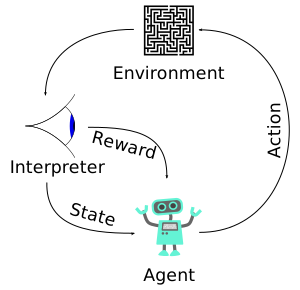
The most important word in any agent definition is loop. If your system only calls the LLM once and returns the answer, it is a chatbot. If it calls tools, reads results, and adjusts its approach, it is an agent.
Chatbot vs AI Agent: A Concrete Comparison
Consider a specific task: "What are the cheapest direct flights from Kuala Lumpur to Tokyo next week?"
A chatbot would:
- Generate a plausible-sounding answer based on training data.
- Possibly invent flight prices or airlines.
- Have no access to real-time flight data.
An agent would:
- Call a flight search tool with the correct parameters.
- Read the real results returned by that tool.
- Filter for direct flights, sort by price, and return accurate, grounded data.
The agent produces an answer based on real information. The chatbot produces a plausible-sounding guess. For simple factual questions that fall within the model's training data, the difference may not matter. For anything requiring current information, action, or multi-step logic, it matters enormously.
The Six Components of an LLM Agent
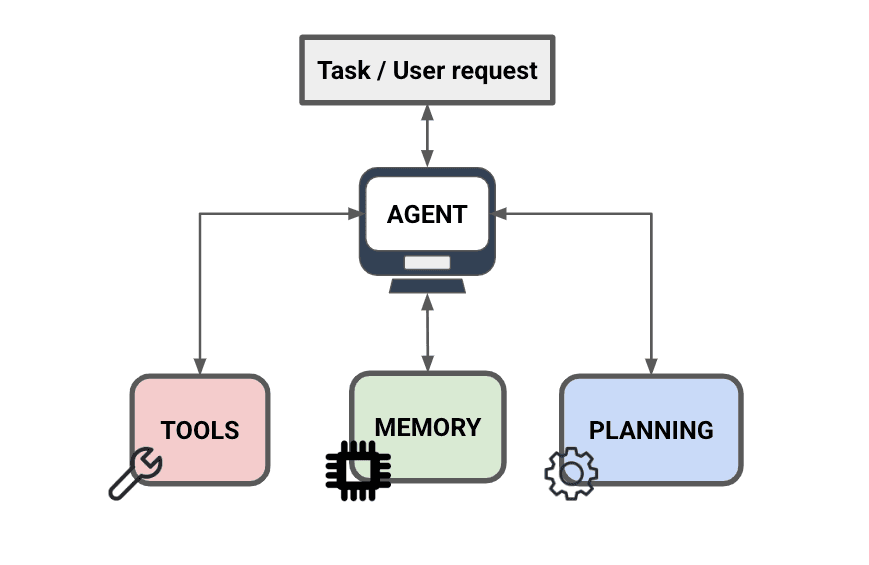
Most agent architectures, regardless of which framework you use (LangChain, AutoGen, custom code), include the same core components. Understanding each one separately makes it much easier to debug and improve an agent system.
1. The LLM, the reasoning engine
The LLM reads the current situation, the user's goal, previous tool results, memory, and decides what to do next. It does not execute actions directly. It produces a decision that the rest of the system acts on. In production, treat the LLM as one component of a larger system, not the system itself.
2. Tools, what the agent can do
Tools are functions or services that the agent can call to interact with the world. Common examples include web search, SQL database queries, vector database retrieval, OCR text extraction from images, calendar scheduling, payment processing, file reading and writing, and API requests to external services. Tools are what allow the agent to go beyond generating text and actually do things. The Model Context Protocol has become a common standard for exposing these tools to an agent without writing a custom integration for each one.
3. Memory, what the agent remembers
Memory allows the agent to maintain context across multiple turns and even across sessions. There are two forms. Short-term memory is the current chat history and working context inside the prompt. Long-term memory is stored externally in a vector database or SQL database and retrieved when relevant (see AI agent memory for a full breakdown of the memory types involved). Without long-term memory, agents reset after each session, users must re-explain everything from scratch, which makes the system feel unreliable.
4. Planner, breaking goals into steps
When a user gives the agent a high-level goal, the planner breaks it into actionable steps. For example, "Summarise my meeting notes and email them to my manager" becomes a sequence: read the document, extract key decisions, draft a summary, compose the email, confirm with the user, then send. Planning gives the agent structure. Without it, the agent tends to take shortcuts or miss steps.
5. Executor, running tool calls safely
The executor is the layer that actually runs tool calls. This is an important design point: the LLM should not directly execute tools. Instead, it outputs a structured request, like a function call, and the backend executor runs it safely. This separation is what makes agents controllable. You can validate, log, and rate-limit tool calls without touching the LLM at all.
6. Verifier, catching mistakes
Many production agents include a verification step that checks whether the agent's answer is consistent with the tool results, and whether any unsafe assumptions were made. This is especially important in domains like finance, healthcare, or legal workflows, where errors are costly and trust is essential.
How It Works: A Step-by-Step Agent Interaction
To see all six components in action, consider a realistic task: "Plan a 3-day Tokyo itinerary with halal food recommendations and estimated costs." This is not a simple question. It requires planning, search, filtering, and synthesis.
Step 1, The user gives a goal. The agent receives the request. Unlike a chatbot, it does not immediately generate an answer. It begins by reasoning about what information it needs.
Step 2, The agent reasons about what to do. The LLM looks at the goal and produces a plan. Which tools should be called? In what order? What information is still missing? The model does not answer the user yet.
Step 3, The agent calls tools. The agent issues structured calls, for attraction search, halal restaurant search, and hotel pricing. Each tool returns real data. The agent does not invent restaurant names or guess at prices.
Step 4, The agent observes the results. After each tool call, the results come back into the agent's context. The LLM reads them and updates its plan. It may ask: do I have enough information to answer? Do I need to call another tool? Are the results conflicting?
Step 5, Memory is used and updated. During the task, the agent retrieves relevant stored preferences: "This user prefers halal food and is on a budget." After the task, it may store new facts for future sessions.
Step 6, The agent produces a final answer. Once the agent has enough grounded information, it generates a final response based on tool results and retrieved memory, not on training data guesses. This is what makes agents more reliable than chatbots for complex tasks.
Practical Example: Customer Support with Escalation
One of the clearest real-world agent applications is tiered customer support. A user contacts support about a delayed order. A simple chatbot would offer a generic apology. An agent does something different.
It first calls the order management tool with the user's order number. It reads the result and sees the order is stuck at a distribution centre. It then calls the courier API to check for delays. The courier API returns a storm advisory in the region. The agent now has grounded information: a specific delay reason, an estimated resolution time, and a compensation policy from the internal knowledge base. It generates a personalised, accurate response. If the delay exceeds the policy threshold, it triggers an escalation tool to assign a human agent.
Throughout this process, no human was needed for the routine steps, and the information was accurate because it came from real tool outputs, not from the model's training data.
Advantages
- Grounded answers. Tool results anchor the model's outputs in real data, reducing hallucination for factual queries.
- Multi-step task completion. Agents can break down complex goals and execute them across many steps without user re-prompting.
- Real-world action capability. With the right tools, agents can send emails, update databases, book appointments, and trigger workflows.
- Persistent memory. Long-term memory means users do not have to repeat context every session, enabling genuinely personalised experiences.
- Adaptability. If a tool call fails or returns unexpected results, the agent can adjust its plan and try a different approach.
Limitations and Trade-offs
- Higher cost. A chatbot makes one API call per message. An agent may make five or more: planning, tool selection, retrieval, reasoning, and final response. Token costs multiply with tool output size.
- Higher latency. Even if each model call takes 2–3 seconds, four sequential steps means 10–15 seconds per user request. Users of real-time applications notice this immediately.
- More failure modes. Each additional component is a new place for things to go wrong. Debugging agents is significantly harder than debugging a single model call.
- Safety risks. Agents that can take real actions, sending emails, making purchases, create real risks if they misunderstand a request. Guardrails are not optional.
- Context window limits. Large tool outputs can fill the context window quickly, causing the model to lose focus on the original goal.
Common Mistakes
- Tool hallucination. The model assumes it called a tool and got a result, but it never actually called it. Always verify that tool calls were executed, not just planned.
- Wrong tool choice. The agent uses web search when a database query would be correct, or vice versa. Provide clear, distinct tool descriptions to help the model choose correctly.
- Infinite loops. The agent keeps calling tools without reaching a stopping condition. Always enforce a maximum tool call limit per request.
- Context pollution. Irrelevant tool outputs fill the context window, causing the model to lose focus. Trim and summarise tool outputs before feeding them back.
- Overconfidence. The agent produces a confident answer even when tool results are incomplete. Add verification steps for high-stakes outputs.
- Skipping guardrails to ship faster. Teams often add guardrails after a production incident rather than before. This is always more costly.
Best Practices
- Start with a single agent before designing a multi-agent system. Complexity should be earned, not assumed.
- Write explicit, descriptive tool definitions. The model's tool selection is only as good as the descriptions it reads.
- Enforce a maximum tool call limit per request and a per-session cost budget to prevent runaway agents.
- Require user approval before the agent takes any irreversible action, sending emails, making payments, deleting records.
- Log every tool call and its result. Observability is what makes agents debuggable in production.
- Trim and summarise tool outputs before returning them to the model context. Never pass raw, unfiltered tool outputs without review.
- Test the agent with adversarial inputs, vague goals, conflicting tool results, and out-of-scope requests, before deploying.
Comparison: Single Agent vs Multi-Agent Systems
| Dimension | Single Agent | Multi-Agent System |
|---|---|---|
| Complexity | Lower, easier to build, debug, and monitor | Higher, inter-agent coordination adds significant complexity |
| Performance | Sufficient for most tasks | Can improve quality on complex workflows with clear specialisation |
| Cost | Lower, fewer total model calls | Higher, multiple agents each consume tokens |
| Latency | Lower | Higher, coordination adds round-trips |
| Best for | Most production use cases | Research workflows, complex pipelines with clear specialised roles |
Most teams should start with a single agent and only move to multi-agent architectures when they have a clear, demonstrated reason. Multi-agent systems can improve quality for complex workflows, but they increase complexity, latency, and cost significantly.
When Should You Use an Agent?
Not every application needs an agent. Agents add complexity, cost, and latency. Use them when tasks genuinely require multiple steps with dependencies, real-time data from external tools, retrieval and synthesis across multiple sources, decision-making logic that adapts based on results, or persistent memory across sessions.
Good use cases include customer support with escalation workflows, report generation from multiple data sources, knowledge base assistants with document retrieval, code review and debugging assistants, and personal productivity assistants that manage calendars, emails, and tasks.
If your product is simple question-and-answer, a chatbot is enough. Reach for agents only when a task genuinely requires multi-step execution that cannot be handled by a single model call.
FAQ
Is ChatGPT with plugins an AI agent?
Yes, when ChatGPT uses plugins or tools to fetch real-time data and takes multiple steps to complete a task, it is functioning as an agent. The underlying architecture, reason, call a tool, observe the result, continue, is the same loop described in this article.
Do I need a specialised framework like LangChain to build an agent?
No. Frameworks like LangChain and AutoGen are helpful for getting started quickly, but an agent is just a loop in code: call the LLM, parse its tool request, run the tool, feed the result back. Many production teams write their own lightweight agent loops to maintain control over behaviour and cost.
How do I prevent an agent from doing something destructive?
Through guardrails: require explicit user confirmation before any irreversible action, enforce tool call limits, validate inputs before running them, and log everything. Never give an agent access to a tool it does not need for the task at hand.
What is the difference between an agent and a RAG system?
RAG (Retrieval-Augmented Generation) is a pattern where a model retrieves documents and uses them to answer a question, typically in a single step. An agent is a loop-based system that can make multiple retrieval calls, use many different tools, update its plan based on results, and repeat. RAG is often one component inside a broader agent system.
How do I control agent costs in production?
Set a maximum number of tool calls per request and a per-session token budget. Trim tool outputs before feeding them back into context. Cache tool results where possible. Use smaller models for planning and routing steps and reserve the larger model for final reasoning and output generation.
References
- Yao, S., et al. (2022). ReAct: Synergizing Reasoning and Acting in Language Models. arXiv:2210.03629.
- Sumers, T. R., et al. (2024). Cognitive Architectures for Language Agents. Transactions on Machine Learning Research.
- Weng, L. (2023). LLM-powered Autonomous Agents. Lilian Weng's Blog. lilianweng.github.io
- Chase, H. (2023). LangChain Agents Documentation. python.langchain.com
- Russell, S., & Norvig, P. (2020). Artificial Intelligence: A Modern Approach (4th ed.). Pearson.
Key Takeaways
- The defining feature of an agent is the loop, reason, act, observe, repeat, not simply having access to tools.
- The LLM requests tool calls; the backend executor runs them. Keeping these separated is what makes agents controllable and safe.
- Agents cost more and run slower than chatbots. Only use them when a task genuinely requires multi-step execution.
- Guardrails, max tool calls, timeouts, user approval for sensitive actions, are required for production agents, not optional extras.
- Start with a single agent. Move to multi-agent architectures only when you have a clear, demonstrated reason to do so.
- Agent performance depends more on system design than on model size. A well-architected pipeline outperforms a larger model running as a basic chatbot.